Hey! I'm very happy with my lucky work in this term. This term is second term for working here. Many students don't like study English but they love me,I think!!!lol It's very happy to think like that. I'm a teacher. Now, I 'm a clerical officer too. It's very excited to manage my time to work.Oh,time's up to type! Enjoy my Friday :)
Thursday, 16 July 2015

Tuesday, 21 May 2013
14 May 2013 begins the term of teachers and 16 May 2013 begins the term of students ## I'm very excited :)
My friend and I at English library. ^^ Her name is Mew. She teach Thai subject and she is my classmate also.

and the last one his name is Boy. He teach physics subject.
.jpg)
Wednesday, 13 February 2013
Valentine's Day 2013
Happy Valentine's Day 2013 ^^
Valentine’s day Song
Artis :Linkin Park
Album: Minutes to Midnight
Artis :Linkin Park
Album: Minutes to Midnight
My insides are turned to ash so slow
ในใจฉันกำลังมอดไหม้เป็นเถ้าถ่านทีละนิด
And blew away as I collapsed so cold
ยามกายที่เย็นชืดของฉันทรุดลงเถ้าถ่านที่มอดไหม้โบยบินไปพร้อมกับสายลม
A black wind took them away from sight
สายลมอันโหดร้ายหอบมันไปไกลแสนไกล
And held the darkness over day that night
ความมืดมิดปกคลุมวันและคืนของฉัน
And the clouds above move closer looking so dissatisfied
กลุ่มเมฆทะมึนพุ่งเข้าหาอย่างไร้ปรานี
but the heartless wind kept blowing, blowing
แต่สายลมที่ไร้เมตตาซัดกระหน่ำไม่ขาดสาย
I used to be my own protection but not now
วินาทีนี้ฉันมิอาจปกป้องตัวฉันอย่างที่เคยเป็น
Cuz my path has lost direction somehow
เพราะจิตวิญญาณของฉันมันมะลายหมดแล้ว
A black wind took you away from sight
เธอลับหายไปกับสายลมที่ไร้เมตตานั้น
And held the darkness over day that night
อีกครั้ง…ความมืดมิดปกคลุมวันและคืนของฉัน
And the clouds above move closer looking so dissatisfied
อีกครั้ง…กลุ่มเมฆทะมึนพุ่งเข้าหาอย่างไร้ปรานี
And the ground below grew colder as they put you down inside
ผืนดินอันเย็นเฉียบได้กลืนเธอไปจนหมดสิ้น
but the heartless wind kept blowing, blowing
สายลมที่ไร้เมตตาก็ยังซัดกระหน่ำฉันไม่ขาดสาย
So now you’re gone and I was wrong
I never knew what it was like to be alone
นาทีนี้ฉันต้องอยู่โดยปราศจากเธอ
ฉันเพิ่งประจักษ์ว่า การอยู่อย่างเดียวดายนั้น มันเจ็บปวดมากกว่าที่ฉันเคยคาด
On a Valentine’s Day, On a Valentine’s Day
โอ้..วันแห่งความรัก ……..
On a Valentine’s Day, On a Valentine’s Day
On a Valentine’s Day, On a Valentine’s Day
On a Valentine’s Day, On a Valentine’s Day
(I used to be my own protection but not now)
On a Valentine’s Day, On a Valentine’s Day
(Cuz my mind has lost direction somehow)
On a Valentine’s Day, On a Valentine’s Day
(I used to be my own protection but not now)
On a Valentine’s Day, On a Valentine’s Day
On a Valentine’s Day, On a Valentine’s Day
On a Valentine’s Day, On a Valentine’s Day
(I used to be my own protection but not now)
On a Valentine’s Day, On a Valentine’s Day
(Cuz my mind has lost direction somehow)
On a Valentine’s Day, On a Valentine’s Day
(I used to be my own protection but not now)
On a Valentine’s Day, On a Valentine’s Day
(Cuz my mind has lost direction somehow)
ใจสลายไร้แล้วซึ่งทางเดิน
Monday, 21 January 2013
Useful links :)
These are useful information for teaching grammar. You can click for learning :)
http://www.phrasebank.manchester.ac.uk/ : The Academic Phrasebank is a general resource for academic writers.
http://www.nclrc.org/essentials/grammar/grindex.htm
http://www.guardian.co.uk/education/2012/jul/30/guardian-teacher-network-resources-grammar
http://esl.about.com/cs/teachingtechnique/a/a_teachgrammar.htm
http://www.teachingenglish.org.uk/blogs/michael-swan/how-teach-grammar-0
http://www.englishteststore.net/
http://www.phrasebank.manchester.ac.uk/ : The Academic Phrasebank is a general resource for academic writers.
http://www.nclrc.org/essentials/grammar/grindex.htm
http://www.guardian.co.uk/education/2012/jul/30/guardian-teacher-network-resources-grammar
http://esl.about.com/cs/teachingtechnique/a/a_teachgrammar.htm
http://www.teachingenglish.org.uk/blogs/michael-swan/how-teach-grammar-0
http://www.englishteststore.net/
Sunday, 20 January 2013
My webpage :)
You can follow me to this webpage. : http://darunwan.webng.com/ Enjoy your visit me ^_______^
Thursday, 20 December 2012
มารู้จัก โปรแกรม Hot potatoes กันค่ะ
โปรแกรม Hot Potatoes
เป็นของมหาวิทยาลัยวิคทอเรีย(University of Victoria) ซึ่งเป็น
โปรแกรมที่ใช้ในการสร้างแบบฝึกหัด แบบบทดสอบ
หรือข้อสอบที่ง่ายและมีความสามารถสูงโปรแกรมหนึ่งใน ปัจจุบัน โปรแกรม
Hot Potatoes จัด เป็นโปรแกรมประเภทที่ไม่ใช่ Freeware
แต่หากใช้เพื่อการศึกษาที่ไม่แสวงหาผลกำไร ครู
อาจารย์ผู้สอนสามารถใช้ได้ ดังข้อความในอินเทอเน็ตเว็บเพจที่แอดเดรส
http://web.uvic.ca/hrd/hotpot/index.htm มีความว่า "Hot
Potatoes is not freeware,but it is free of charge for non-profit
educational users who make their pages available on the web." โปรแกรมนี้สามารถดาวน์โหลด (Download) ได้จาก อินเทอร์เน็ต โดยไม่ต้องเสียค่าบริการใดๆ
โปรแกรม HOTPOTATOES สามารถสร้างข้อสอบได้หลายแบบ เช่น เติมคำ เลือกตอบ เรียงคำ จับคู่ ปริศนาอักษรไขว้ โดยสามารถสร้างให้แสดงผลเป็นภาษาไทยได้
Tuesday, 4 December 2012
Conservation Camp in Satun
I went to Satun with friends during 1-2 December 2012.


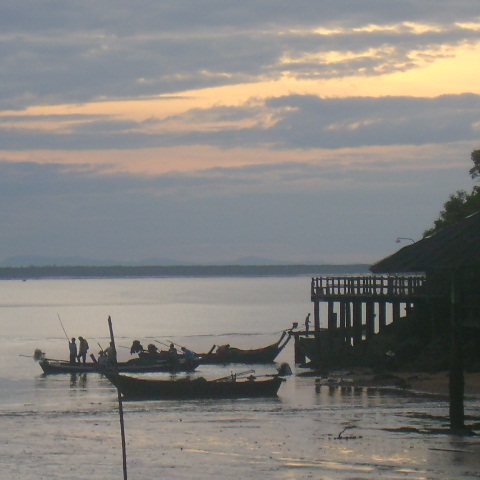
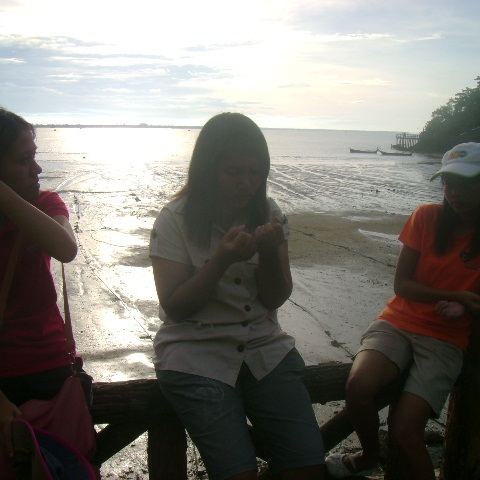
There is the ebb tide in the morning like the background of the photo.

It's difficult to walk for planting but It's easy to plant mangrove.
Finally, we asked the answer to buddy and buder. This activity made me fun. So I'm impressived that I participated in this camp. My friends and other participate are good friends. I will never forget this new expirences. :)
Borripat waterfall
The first place we visitted Borripat waterfall to ate lunch.
The boat at Mu Ko Phetra National Park
Then we went to Mu Ko Phetra National Park. We roodted here also.
The moon in the dark sky at night
This picture shown the raising tide at night also. We walked around the camp after we have joined together to take lable for finding buddy and budder.Then we saw the moon at Laemhinkon Tower.
The preparation for fishing of fisherman
We got up early to saw the sun rais and taked photos in the morning.
We waited other members for planting mangrove forest
There is the ebb tide in the morning like the background of the photo.
Mangrove forest that were planted by us
It's difficult to walk for planting but It's easy to plant mangrove.
Finally, we asked the answer to buddy and buder. This activity made me fun. So I'm impressived that I participated in this camp. My friends and other participate are good friends. I will never forget this new expirences. :)
Wednesday, 28 November 2012
Loy Krathong Festival

Loy Krathong Festival
Loy Krathong Day is one of the most popular festivals of Thailand celebrated annually on the Full-Moon Day of the Twelfth Lunar Month. It takes place at a time when the weather is fine as the rainy season is over and there is a high water level all over the country. The word “Loy”means“to float and “Krathong” means lotus-shaped vessel made of banana leaves. Loy Krathong is, therefore the floating of an illuminated leaf bowl. But nowadays some krathongs are made of coloured paper. A krathong usually contains a candle, three joss sticks, some flowers and coins. The history of Loy Krathong Festival is slightly obscure. First, it is to ask for apology from the water goddess for having used and sometimes made rivers and canals dirty. Second, it is to offer flowers, candles and joss sticks as a tribute to the footprint of Lord Buddha on the sandy beach of the Nammatha River in India. Third, it is to show gratitude to the Phra Mae Kong Ka or Mother of Water. Fourth, it is to wash away the previous year’s misfortunes.
information from :http://school.obec.go.th/nongplamowit/loykrathong.html
picture from :http//variety.horoworld.com/
Tuesday, 27 November 2012
24th November 2012 Went to the temples

Chathingpra Temple
วัดจะทิ้งพระ วัดแรกที่ได้มาสักการะพระนอน ซึ่งวัดจะทิ้งพระเป็นวัดที่มีพระนอนที่สวยงามอยู่ในอุโบสถส์

Thakura Temple

Jaomae-u-hua @Thakura Temple
วัดท่าคุระ เป็นวัดที่มีประวัติความเป็นมาที่น่าสนใจ เป็นเรื่องเล่าเกี่ยวกับพระแม่อยู่หัว สิ่งศักดิ์สิทธิ์ที่ชาวบ้านเคารพบูชา เป็นองค์พระพุทธรูปที่หล่อมาจากทองคำแท้กว้างประมาณ 2-3 นิ้ว

Salaloi Temple

Silaloi Temple's Abbot
วัดศิลาลอย หรือที่ชาวบ้านเรียกว่า 'วัดกระ' เป็นวัดที่เก่าแก่วัดหนึ่งในจังหวัดสงขลา

Jaydee-ngam Temple
พักรับประทานอาหารเที่ยงที่วัดเจดีย์งาม เมนูในมื้อนี้เหมือนได้กลับไปกินที่บ้านเลยค่ะ ภายในวัดมีพระธาตุซึ่งสร้างจากปากะรังทั้งหมด

'ชอตนี้กับเสียงกระดิ่ง!!!'
ขณะที่กำลังถ่ายรูปดิฉันเดินผ่านไปผ่านมาไม่ได้ยินเสียงกระดิ่งที่หัวเรือสุพรรณหงส์นี้เลย บังเอิญนึกอยากถ่ายที่กระดิ่ง พอกดซัตเตอร์กระดิ่งดัง 3 ครั้ง ขนลุกด้วยความดีใจ 555++

Phakoh Temple
ครั้งที่สองกับการมาเยือนวัดพะโคะ เป็นวัดที่มีความเจริญและสวยงาม สร้างอยู่บนภูเขา มีความร่มรื่น มีมัคคุเทศน์น้อยที่คอยบรรยายประวัติและความสำคัญของวัดแก่ผู้มาสักการะบูชาหลวงพ่อทวดเหยียบน้ำทะเลจืด

Sumnaksong Tonlieb
สำนักสงฆ์ต้นเลียบ มีความสำคัญ คือเป็นสถานที่ฝังรกของหลวงพ่อทวดเหยียบน้ำทะเลจืด

Jaydeeluang Temple
วัดดีหลวง สร้างขึ้นในสมัยอยุธยา เป็นวัดที่หลวงพ่อทวดเหยียบน้ำทะเลจือเคยบวชเรียนเป็นสามเณร ทำบุญ 7 วัดในครั้งนี้ เป็นประสบการณ์ช่วงปี 4 ก่อนไปฝึกสอน ทำให้ดิฉันประทับใจ ที่ได้ร่วมทำบุญกับเพื่อนๆ น้องๆ คณะเดียวกันและต่างคณะ และวันนี้ก็เป็นวันคล้ายวันเกิด ที่ตรงกันทั้งวันและวันที่ ได้รับทั้งน้ำฝน น้ำมนต์ และน้ำใจ อิ่มบุญกันถ้วนหน้า :)
Sunday, 11 November 2012
How to change mouse in your blogger
วิธีเปลี่ยนรูปเมาส์ในบล็อก
เ
สวัสดีครับ
มาพบกันอีกครั้งนะครับ คราวนี้มีคนเรียกร้องเข้ามาให้สอนวิธีเปลี่ยนรูปตัวชี้เมาส์ (mouse pointer) ในบล็อก ผมก็ไปสืบเสาะ บุกป่าฝ่าดง ฟาดฟันกับศัตรู ฯลฯ จนได้มาในที่สุด
เพื่อไม่ให้เป็นการเสียเวลา เรามาเริ่มกันเลยดีกว่าครับ
1. ขั้นแรกก็ให้เข้าไปที่เว็บ http://www.cursors-4u.com เข้าไปเลยครับ

2. เลือกแบบเมาส์ที่ต้องการ โดยเมนูจะอยู่ด้านซ้ายมือนะครับ เลือกหมวดที่ใช่ ชนิดที่ชอบได้เลยครับ

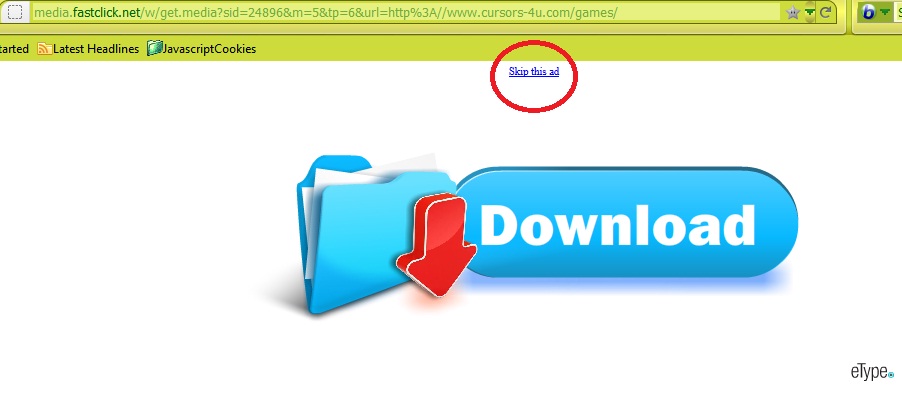
3. เราก็จะมาพบกับโฆษณาแฝงครับ ไม่ต้องตกใจ กด skip this ads ตัวเล็กๆ ด้านบนได้เลยครับ

4. ต่อมาก็จะมีหมวดย่อยให้เลือกครับ เลือกเลย

5. หลังจากเลือกหมวดย่อยแล้ว เราก็จะได้เลือกรูปแบบของเมาส์กันสักทีนะครับ
6. สังเกตในรูปนะครับ อันไหนที่เขียนว่า cursor set อย่าไปเอานะครับ เพราะมันมาเป็นเซ็ต ใช้ในบล็อกไม่ได้

7. เมื่อได้แบบของเมาส์ที่ต้องการแล้วก็คลิกเข้าไปเลยครับ
8. ไม่ต้องกดดาวน์โหลดนะครับ ให้หาแท๊บที่เขียนว่า blogger/blogspot แบบในรูป แล้วคลิกเข้าไป

9. เนื่องจากเราใช้บล็อกรูปแบบใหม่ ดังนั้นให้ coppy โค้ดจากช่องล่างที่เขียนว่า new blogger/blogspot interface ตามรูปเลยครับ

10. ขั้นต่อไปก็ไปที่ blogger.com ล็อกอินเข้าหน้าแดชบอร์ด

11. เลือกบล็อกที่เราจะเปลี่ยนรูปเมาส์ครับ แล้วกดลูกศรชี้ลงที่หมายเลข 4 ตามรูป

12. เลือกแม่แบบครับ เมื่อได้หน้าจอดังรูปข้างล่างแล้ว ก็กดตรง "แก้ไขHTML"

13. ก็จะเข้าสู้หน้าจอเตือนการแก้ไข HTML ครับ หน้าจอนี้จะแจ้งเตือนทุกครั้ง ที่เราจะเข้าไปแก้ไข HTML ซึ่งเป็นภาษาที่ใช้สำหรับเขียนเว็บ หากทำสุ่มสี่สุ่มห้าไป อาจทำให้เกิดความเสียหายต่อหน้าเว็บบล็อกของเราได้ เขาเลยต้องเตือนไว้ก่อน แต่ไม่ต้องกลัวครับ ถ้าไม่ทำเกินที่ผมบอก รับรองไม่เป็นไร ก็เลือก "ดำเนินการ" ได้เลย

14. พอเข้ามาแล้วก็เจอตัวยึกยือ ยึกยือเต็มไปหมดใช่ใหม่ครับ นี่แหละภาษา HTML บวกด้วย Java อย่าไปใส่ใจครับมองหาบรรทัดที่ 14 ที่จะเขียนว่า
<title><.....................></title> (ตรงจุดๆนั่นอาจจะไม่เหมือนกันครับ แต่ให้หาที่มี title ก็พอ
สังเกตในรูปนะครับ ใต้บรรทัดที่ 14 จะมีบรรทัดว่างอยู่ 1 บรรทัด ให้เอาโค้ดที่เรา copy มา Paste ลงตรงนั้นเลยครับ จากนั้นก็กดบันทึกเทมเพลต

15. แล้วก็เข้าไปดูบล็อกได้เลย เมาส์เปลี่ยนไปแล้ววววว
มาพบกันอีกครั้งนะครับ คราวนี้มีคนเรียกร้องเข้ามาให้สอนวิธีเปลี่ยนรูปตัวชี้เมาส์ (mouse pointer) ในบล็อก ผมก็ไปสืบเสาะ บุกป่าฝ่าดง ฟาดฟันกับศัตรู ฯลฯ จนได้มาในที่สุด
เพื่อไม่ให้เป็นการเสียเวลา เรามาเริ่มกันเลยดีกว่าครับ
1. ขั้นแรกก็ให้เข้าไปที่เว็บ http://www.cursors-4u.com เข้าไปเลยครับ

2. เลือกแบบเมาส์ที่ต้องการ โดยเมนูจะอยู่ด้านซ้ายมือนะครับ เลือกหมวดที่ใช่ ชนิดที่ชอบได้เลยครับ

3. เราก็จะมาพบกับโฆษณาแฝงครับ ไม่ต้องตกใจ กด skip this ads ตัวเล็กๆ ด้านบนได้เลยครับ
4. ต่อมาก็จะมีหมวดย่อยให้เลือกครับ เลือกเลย

5. หลังจากเลือกหมวดย่อยแล้ว เราก็จะได้เลือกรูปแบบของเมาส์กันสักทีนะครับ
6. สังเกตในรูปนะครับ อันไหนที่เขียนว่า cursor set อย่าไปเอานะครับ เพราะมันมาเป็นเซ็ต ใช้ในบล็อกไม่ได้

7. เมื่อได้แบบของเมาส์ที่ต้องการแล้วก็คลิกเข้าไปเลยครับ
8. ไม่ต้องกดดาวน์โหลดนะครับ ให้หาแท๊บที่เขียนว่า blogger/blogspot แบบในรูป แล้วคลิกเข้าไป

9. เนื่องจากเราใช้บล็อกรูปแบบใหม่ ดังนั้นให้ coppy โค้ดจากช่องล่างที่เขียนว่า new blogger/blogspot interface ตามรูปเลยครับ

10. ขั้นต่อไปก็ไปที่ blogger.com ล็อกอินเข้าหน้าแดชบอร์ด

11. เลือกบล็อกที่เราจะเปลี่ยนรูปเมาส์ครับ แล้วกดลูกศรชี้ลงที่หมายเลข 4 ตามรูป

12. เลือกแม่แบบครับ เมื่อได้หน้าจอดังรูปข้างล่างแล้ว ก็กดตรง "แก้ไขHTML"

13. ก็จะเข้าสู้หน้าจอเตือนการแก้ไข HTML ครับ หน้าจอนี้จะแจ้งเตือนทุกครั้ง ที่เราจะเข้าไปแก้ไข HTML ซึ่งเป็นภาษาที่ใช้สำหรับเขียนเว็บ หากทำสุ่มสี่สุ่มห้าไป อาจทำให้เกิดความเสียหายต่อหน้าเว็บบล็อกของเราได้ เขาเลยต้องเตือนไว้ก่อน แต่ไม่ต้องกลัวครับ ถ้าไม่ทำเกินที่ผมบอก รับรองไม่เป็นไร ก็เลือก "ดำเนินการ" ได้เลย

14. พอเข้ามาแล้วก็เจอตัวยึกยือ ยึกยือเต็มไปหมดใช่ใหม่ครับ นี่แหละภาษา HTML บวกด้วย Java อย่าไปใส่ใจครับมองหาบรรทัดที่ 14 ที่จะเขียนว่า
<title><.....................></title> (ตรงจุดๆนั่นอาจจะไม่เหมือนกันครับ แต่ให้หาที่มี title ก็พอ
สังเกตในรูปนะครับ ใต้บรรทัดที่ 14 จะมีบรรทัดว่างอยู่ 1 บรรทัด ให้เอาโค้ดที่เรา copy มา Paste ลงตรงนั้นเลยครับ จากนั้นก็กดบันทึกเทมเพลต

15. แล้วก็เข้าไปดูบล็อกได้เลย เมาส์เปลี่ยนไปแล้ววววว
By http://newpublog.blogspot.com/2012/06/blog-post.html
ขอขอบคุณด้วยนะคะ :)
ขอขอบคุณด้วยนะคะ :)
Subscribe to:
Posts (Atom)